


SMS Virtual - Receive SMS
4.53.38K Reviews
App Specs
- Version
- 1.4.0
- Updated On
- License
- Free
- Downloads
- 1,000,000+
- Developer
- Tecrow Apps
- Categories
- Communication
- Platform
- Android, iOS
Screenshots
 Analysis by AppCompare
I’d treat SMS Virtual - Receive SMS as a tool for a narrow job, not a replacement for my regular phone number. It is a communication app from Tecrow Apps, built around receiving SMS verification messages. That focus can be handy when I want to keep a signup separate from my everyday number, but it also means the app’s usefulness depends on a few things outside its control: a working internet connection, an available number, and whether the service I’m signing up for accepts that number.
Using a temporary number in real life
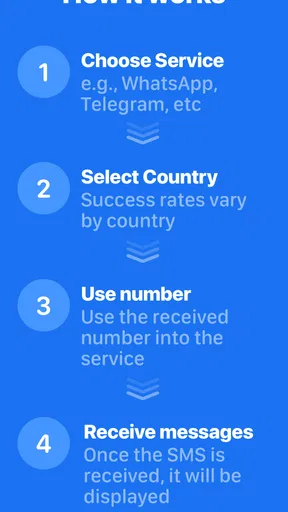
A realistic use is signing up for a one-off website while I’m on a tablet or travelling and would rather not hand over my personal number. I’d open the app, choose an available number, enter it on the service asking for verification, then return to check for the incoming code. That is a simple workflow, but it is worth keeping the signup screen open or noting which number I selected; switching between apps or choosing another number midway can make it harder to match a message to the right attempt.
The app is free to install, and its Everyone content rating makes it broadly accessible. It has an average rating of 4.5 from around 73,000 ratings, with about 2,500 written reviews and more than a million installs. Those figures suggest it has found an audience, but they cannot promise that a particular number will work with a particular service. The current version is 1.3.1, and it requires Android 6.0 or later. Optional in-app purchases range from $0.49 to $2.99 per item, so I’d check the in-app choice and cost before committing to anything paid.
When the connection is part of the experience
This is not just a matter of opening an app and expecting a code to appear. The number needs to be reachable through the service, and the app needs a usable network connection to show incoming messages. If I’m in a basement, on weak public Wi-Fi, or moving between networks, a delay may come from connectivity rather than from the verification service itself. I would avoid repeatedly requesting new codes while a message is pending: that can create confusion about which code is current and whether I’m still using the same number.
For a smoother attempt, I’d first make sure I have a stable connection, select the number, and only then start the other service’s verification step. If the code does not appear right away, I’d wait briefly and check the app again before restarting the process. This little bit of patience matters more here than it does with a normal SIM, because a temporary-number workflow gives me fewer familiar ways to diagnose a delay.
Where it fits among alternatives
Compared with using my personal SIM, a temporary-number app can reduce how often I share my everyday contact number with services I may use only once. A second SIM or a dedicated prepaid phone gives a clearer separation and may be preferable for accounts I expect to keep, but it involves maintaining another line or device. SMS Virtual is more convenient when the need is occasional and limited to receiving a verification text; it is not the choice I’d make for ongoing conversations, account recovery I cannot afford to lose, or anything that needs dependable two-way contact.
It also differs from email-based verification and authenticator apps. If a service offers one of those, I generally prefer it for an account I plan to use long term, because the verification method is tied to an inbox or authenticator rather than a temporary number. This app makes more sense when SMS is the required route and I have a low-stakes reason to keep my personal number out of the form. I would not use a temporary number as the sole recovery method for banking, work, or an important account.
Worth Reading Before You Choose

Flipboard Shows What News Apps Must Do Beyond the Feed

Switching to Android Auto Means Rethinking Your Driving Routine

Google Calendar Makes a Crowded Week Easier to Manage

Ludo King Makes the Most of the Minutes Between Plans

Baby Panda World Brings Quick Play to Modern Phones, but Its Game Library Feels Busy

ESPN’s Live Game View Makes Following Close Games Easier
Choosing a number and handling a missed code
The country options can be useful when a service expects a particular region, but selecting a matching country does not guarantee acceptance. Services may reject virtual or shared numbers, and availability can change. I’d treat the country list as a practical choice rather than a promise that every number will pass every verification check. If a service refuses the number, the sensible next step is to use its approved alternative or a number I control, not to keep cycling through options for an account where reliability matters.
If nothing arrives, I’d check the basics in order: confirm the number was entered correctly, make sure the app still has a connection, and give the message a little time. Then I’d look at the service’s own resend or alternative verification options. Starting over immediately can make it unclear whether the original text is late or a fresh request has replaced it. For a time-sensitive login, having another verification method ready is a better plan than assuming an SMS will arrive on demand.
There is also a privacy trade-off worth understanding. Keeping a personal number off a signup form can reduce exposure of that number, but a temporary number is not the same as a private line reserved just for me. I would avoid using it for sensitive accounts or sending it to someone who needs to reach me later. Before entering any code, I’d consider what the account is for and whether I would be comfortable losing access if I could not use that number again.
Mobile use and data-conscious habits
On a phone, the main convenience is being able to move between the signup page and the SMS inbox without carrying another device. That is especially useful when verifying a casual account during a commute or while travelling. The drawback is that switching apps can interrupt my place in a form, particularly if the service refreshes or times out. I’d keep the signup details handy and avoid beginning the process when I know I’ll have to jump between unstable networks.
For a data-conscious approach, I’d use a trusted Wi-Fi connection when practical and open the app only when I’m expecting a message, rather than repeatedly refreshing while waiting. That is a sensible habit for conserving mobile data and avoiding needless retries; it is not a guarantee of faster delivery. If I’m roaming or on an unreliable connection, I’d postpone a non-urgent signup until I can complete the exchange in one go.
Someone who needs to send texts, keep a stable personal number, or receive calls should skip this app and use a regular mobile line or another service designed for ongoing communication. It is also a poor fit for people who want a guaranteed route into important accounts. Its value is in occasional, limited-purpose SMS reception, not in replacing a phone plan or acting as a secure identity system.
What the trade-offs mean day to day
In my view, the strongest reason to try SMS Virtual - Receive SMS is a small, specific task: separating a casual registration from my main number when SMS is the only verification option. The weak point is that both number availability and acceptance are controlled by the circumstances of the signup, so I would not build an important account around it. A free starting point makes it easy to consider, while the optional purchases are a reason to check what is included before spending.
The app’s store summary describes online SMS verification, and that is the right expectation to bring to it: a focused utility for receiving a code, rather than a full messaging service. I’d use it selectively, keep a backup verification route for anything valuable, and avoid treating a successful one-time signup as proof that the same number will work elsewhere. That careful approach makes the convenience more useful without asking the app to do a job it was not designed for.
If you’ve ever needed a quick and hassle-free way to verify accounts or bypass pesky SMS verifications, then SMS Virtual might just become your new best friend. I recently took it for a spin, and here's everything you need to know about it.
Getting Started with SMS Virtual
Diving into the app, the first thing you'll notice is its user-friendly interface. No need to be a tech wizard here. You simply download it, and bam—you’re greeted with a clean and intuitive layout. I love when apps don’t make me jump through hoops to get to what I need. With SMS Virtual, you can start receiving SMS messages almost instantly after setting it up.
How It Works
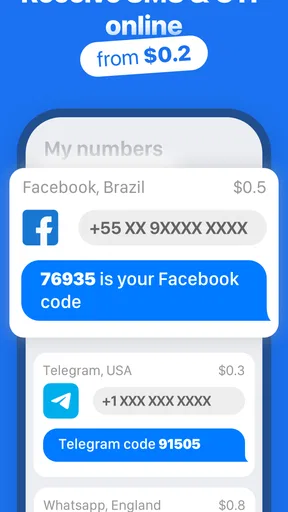
The magic of this app lies in its simplicity. It provides you with a temporary phone number that you can use for receiving SMS messages. Whether you're signing up for a new service or need to verify your identity without using your personal number, this app has got you covered.
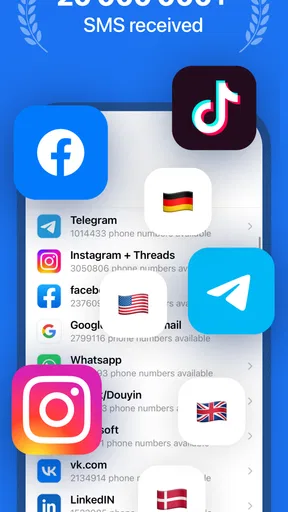
I found the process almost too easy. You select a number from the available list—these numbers are from different countries, which is pretty cool if you’re dealing with services that require a specific region. Once you have your number, you can use it wherever you need an SMS verification.
Why You Might Love It
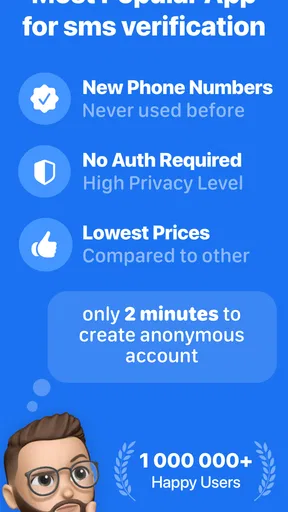
Now, here’s the thing. In our digital lives, privacy is everything. We’re constantly signing up for stuff online, and not all of us are comfortable giving out our personal digits. This app solves that problem by offering a layer of anonymity. It’s like having a burner phone, without actually having to buy one.
Plus, let’s talk about convenience. No one wants to wait around for codes that never arrive. With this app, the SMS messages come through in seconds. I tested it with several different services, and each time, it worked like a charm.
Room for Improvement
Of course, no app is perfect. While I didn’t encounter any major issues, the availability of numbers can sometimes be limited. It might be a bit of a bummer if you're looking for a number from a specific country and it's not available at the moment.
Also, keep in mind that this app is purely for receiving SMS messages. You won’t be able to send messages with it, so if you’re looking for two-way communication, you’ll have to look elsewhere. But honestly, for what it offers, it does a pretty stellar job.
Final Thoughts
So, who is this app for? If you’re someone who values privacy and needs a temporary solution for receiving verification codes, this app is a no-brainer. It’s easy, efficient, and saves you from the hassle of spam calls or messages on your personal number.
Whether you’re a frequent traveler, a digital nomad, or just someone who loves trying out new apps and services, this app is worth checking out. It's like having a secret weapon in your digital toolkit. And I mean, who wouldn’t want that?
Ready to give it a whirl? You can download it directly from the app store and start enjoying the perks of digital anonymity today!
Pros
- Easy to use interface for quick access.
- Supports multiple virtual numbers worldwide.
- No registration required for initial use.
- Affordable pricing for premium features.
- Reliable message delivery and reception.
Cons
- Limited free message reception per number.
- Occasional delays in message delivery.
- Ads can be intrusive in the free version.
- Requires internet connection to work.
- No support for sending SMS from app.
FAQs for SMS Virtual - Receive SMS
What is SMS Virtual - Receive SMS and how does it work?
SMS Virtual - Receive SMS is an app that allows users to receive SMS messages online without using their personal phone numbers. It provides temporary numbers from various countries, which can be used for verification or other purposes. Once a number is selected, any SMS sent to it is displayed within the app interface.
Is SMS Virtual - Receive SMS free to use, or are there any charges involved?
The app offers both free and paid options. Users can access a limited number of temporary numbers for free, but there might be charges for accessing premium numbers or purchasing additional features such as longer number retention or specific country codes. Always check the app for the latest pricing details.
Is it safe to use SMS Virtual - Receive SMS for receiving verification codes?
While SMS Virtual - Receive SMS is generally safe, users should be cautious about sharing sensitive information. Since numbers are temporary and public, messages received can be accessed by others. It's recommended to use the app for non-sensitive verifications and check reviews for the latest security updates.
Can I use SMS Virtual - Receive SMS for receiving SMS from any country?
The app supports numbers from a wide range of countries, offering global coverage. However, availability can vary, and not all countries may be supported at all times. Users can choose from the list of available numbers within the app and should verify if their desired country is included.
How long can I keep a temporary number on SMS Virtual - Receive SMS?
Temporary numbers on SMS Virtual - Receive SMS are typically available for short durations, often ranging from a few minutes to hours. The exact retention period can vary based on the app's policies and whether the user opts for any premium features. It's advisable to check within the app for specific details on number retention.


